

Website performance has officially become one of the strongest SEO ranking signals in 2026. Search engines and AI-driven discovery platforms now reward websites that feel fast, effortless, and trustworthy from the very first second a user lands on them. It’s no longer enough for a website to simply look good—it must load instantly, respond smoothly, and maintain a stable layout throughout the entire user journey. If your website fails modern Core Web Vitals, or their expanded 2026 equivalent, Web Experience Signals (WXS), your visibility, conversions, and overall authority in your industry are directly—and noticeably—affected.
For many business owners, that can feel overwhelming. You may have spent years refining your brand image, designing a beautiful website, or building a growing digital presence, only to discover that much of your success now depends on deeper technical performance factors. But that’s exactly why this guide exists.
The truth is simple: you can absolutely pass Core Web Vitals, even if you’ve struggled before, even if your site is full of content, and even if you’re running a complex setup like WooCommerce, Shopify apps, or custom Wix templates. With the right approach—and the right understanding of what search engines now measure—you’ll regain control, reclaim speed, and outperform slower competitors no matter how large their budgets are.
This guide that Wedū Media proudly presents is designed to give you complete clarity, confidence, and a proven path forward. We created this resource to cut through the noise, simplify the technical jargon, and empower you to take full ownership of your website’s performance. If you’ve ever wondered:
• Why isn’t my site performing as well as it should?
• Why did traffic dip even though nothing “visually” changed?
• How do I know what’s actually slowing things down?
• Can WordPress, Shopify, or Wix really pass these tests?
• What steps do developers take behind the scenes to optimize a site?
This is the guide you’ve been looking for.
What Is Core Web Vitals Or Web Experience Signals?
Let’s shift and talk about exactly what Core Web Vitals are, how they evolved into the much deeper Web Experience Signals for 2026, why these metrics matter, and how to interpret the Lighthouse reports that determine whether your site passes or fails. More importantly, we’ll walk you step-by-step through the real optimization workflow that Wedū Media uses to consistently get WordPress, WooCommerce, Shopify, and Wix websites scoring in the green.
Whether you’re a business owner, a marketer, a developer, or someone just trying to finally understand these metrics without all the technical confusion—this guide will reveal everything you need to know. By the end, you’ll understand not only how to fix performance issues, but how to prevent them, maintain them, and build a futureproof website that ranks, converts, and delivers the fast experience modern users expect.
If your goal is a faster website, higher rankings, better ROI from your ads, or simply more trust from your customers… you’re in exactly the right place. This is where your transformation begins.
You’ll learn:
- What Core Web Vitals & Web Experience Signals are
- Why they affect rankings more in 2026 than any previous year
- How Lighthouse audits work and how to interpret them
- What causes most websites to fail CWV tests
- Platform-specific strategies for WordPress, Shopify, and Wix
- A one-click button to generate Lighthouse reports
- The exact optimization workflow Wedū Media uses to get sites to pass
Let’s start by understanding what Core Web Vitals have evolved into this year.
These Are the Key Metrics You Must Pass in 2026
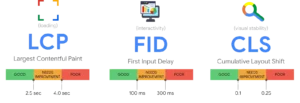
- LCP (Largest Contentful Paint) – Measures loading stability and speed. This should be under 2.5 seconds.
- INP (Interaction to Next Paint) – Replaced FID. Measures responsiveness to user gestures/clicks. Should be under 200ms.
- CLS (Cumulative Layout Shift) – Measures how much your page “jumps” while loading. Should be under 0.1.
- TTFB (Time to First Byte) – Evaluates server speed. Should be under 0.6 seconds.
- TTI (Time To Interactive) – The point where the page is fully usable. Under 5 seconds is standard.
- FCP (First Contentful Paint) – How quickly the user sees the first part of the page appear.
These metrics combine to create a direct representation of how your site feels to a visitor—not just how fast it loads on paper.
Why Core Web Vitals Are More Important than Ever
In previous years, high-quality content and backlinks alone could keep a site ranking well. But with the rise of AI-driven ranking systems, speed and responsiveness are now some of the most important ranking factors of all.
Here’s why:
- Search engines and AI need fast-loading pages to evaluate and cache content efficiently.
- User behaviour metrics (bounce, dwell time, scroll depth) now heavily influence rankings.
- Slow websites receive fewer impressions in Google Discover, SGE, and AI-powered recommendations.
- Ad performance drops significantly when pages load poorly.
- Mobile-first indexing penalizes heavy sites even more.
In 2026, speed isn’t optional—it directly determines whether your business even shows up.
Common Reasons Websites Fail Core Web Vitals
90% of failing CWV scores come down to a handful of root issues. If your site fails, it is almost always because of:
- Oversized or unoptimized images
- Too many JavaScript files
- Heavy or outdated themes
- Too many plugins/apps
- Poor server performance
- Unoptimized animations or effects
- Third-party scripts (tracking pixels, heatmaps, chat widgets)
- Unstable page elements
The good news: every item on this list is fixable—and often without redesigning the entire site.
How to View a Lighthouse Report (Your CWV Diagnostic Tool)
A Lighthouse Report is your roadmap to passing Core Web Vitals. It shows your real scoring metrics and tells you what needs fixing.
3 Ways to Run Lighthouse
1. Using Chrome DevTools
- Open your website in Chrome
- Right-click → “Inspect”
- Click the Lighthouse tab
- Select Mobile or Desktop
- Click Generate Report
2. Using PageSpeed Insights
Go to: https://pagespeed.web.dev
Enter your URL and view your real-user and lab results.
^ This instantly opens a full report for the current page
How To Pass Core Web Vitals on Shopify
Shopify is known for its speed, but apps and heavy themes can still cause CWV failures.
1. Use a Fast Theme
Stick to streamlined themes like:
- Dawn (Shopify’s native theme)
- Craft
- Studio
2. Limit Apps
Each Shopify app injects scripts that slow your site by:
- Adding JS/CSS files
- Blocking rendering
- Increasing server load
Remove anything non-essential.
3. Compress All Images
Shopify already handles a lot—but you must still optimize your product media.
4. Reduce Third-Party Scripts
Chat widgets, tracking pixels, and heatmaps often kill INP scores.
5. Defer Non-Critical Scripts
You can use Shopify’s built-in “lazy loading” for media and sections.
How To Pass Core Web Vitals on Wix
Wix has undergone massive improvements since 2023 and can easily hit green scores.
1. Choose a Modern Template
Older templates carry legacy code that slows your site down.
2. Limit Custom Scripts
Wix offers countless embeds—but they can slow your site quickly.
3. Optimize Media
- Use WebP files
- Avoid oversized background videos
- Compress everything
4. Use Built-In Performance Settings
- Lazy loading
- Responsive image sizes
- Preloading settings
With proper handling, Wix passes CWV with ease.
The Wedū Media Optimization Workflow (How We Make Sites Pass)
At Wedū Media, our optimization workflow is built to do one thing exceptionally well: help websites pass Core Web Vitals with confidence and deliver the fast, stable experiences that modern users expect. Every project we take on begins with a full technical audit to uncover performance bottlenecks, followed by strategic improvements that enhance Lighthouse scores, strengthen Web Experience Signals, and elevate overall user experience. From fine-tuning server performance and optimizing themes to restructuring scripts, cleaning up plugins, and implementing best-in-class caching, our team knows exactly how to transform slow or inconsistent sites into high-performing digital assets. If your website needs a complete performance upgrade or you’re considering a professionally built, fully optimized site from the ground up, Wedū Media’s website development services are designed to deliver measurable results you can actually feel.Our process is built to maximize Lighthouse, Core Web Vitals, and overall UX performance. Here’s how we do it:
1. Full Lighthouse + PageSpeed + Web Experience Signals Audit
- Mobile and desktop audits
- Lab + real-user data assessments
- Script analysis
2. Theme & Template Optimization
- Critical CSS generation
- Removal of unused CSS
- Theme code cleanup
3. JavaScript Reduction
- Defer non-critical JS
- Remove unused libraries
- Delay scripts until interaction
4. Image Automation
- Convert to WebP
- Compress dynamically
- Serve responsive images
5. Server-Level Speed Upgrades
- CDN tuning
- Edge caching
- Object caching
6. Platform-Specific Optimization
- WooCommerce cleanup
- Shopify theme optimization
- Wix media and template improvements
7. Final Verification
- Re-run Lighthouse
- Validate Core Web Vitals
- Confirm Web Experience Signals meet 2026 thresholds
Final Thoughts: Passing Core Web Vitals Is Not Optional in 2026
Search engines now rely on performance metrics to separate the best sites from the rest. Passing Core Web Vitals means:
- Higher rankings
- Faster crawling and indexing
- Better visibility in AI-driven search
- Lower bounce rates
- Higher conversions
- Cheaper ad costs
Whether you’re on WordPress, Shopify, or Wix, you can absolutely pass every metric with the right optimization strategy. Wedū Media specializes in building, fixing, and optimizing sites to outperform your competitors in speed, stability, and user experience.


